


More Impact. Less Effort.
Building a campaign takes time, careful thought, and several manual steps. With DiA, improve your marketing team’s efficiency and move faster from an idea to concrete initiatives.
DiA supports your marketing teams at every stage, from understanding your contacts’ interests and creating segments to structuring automated campaigns and generating personalized messages.
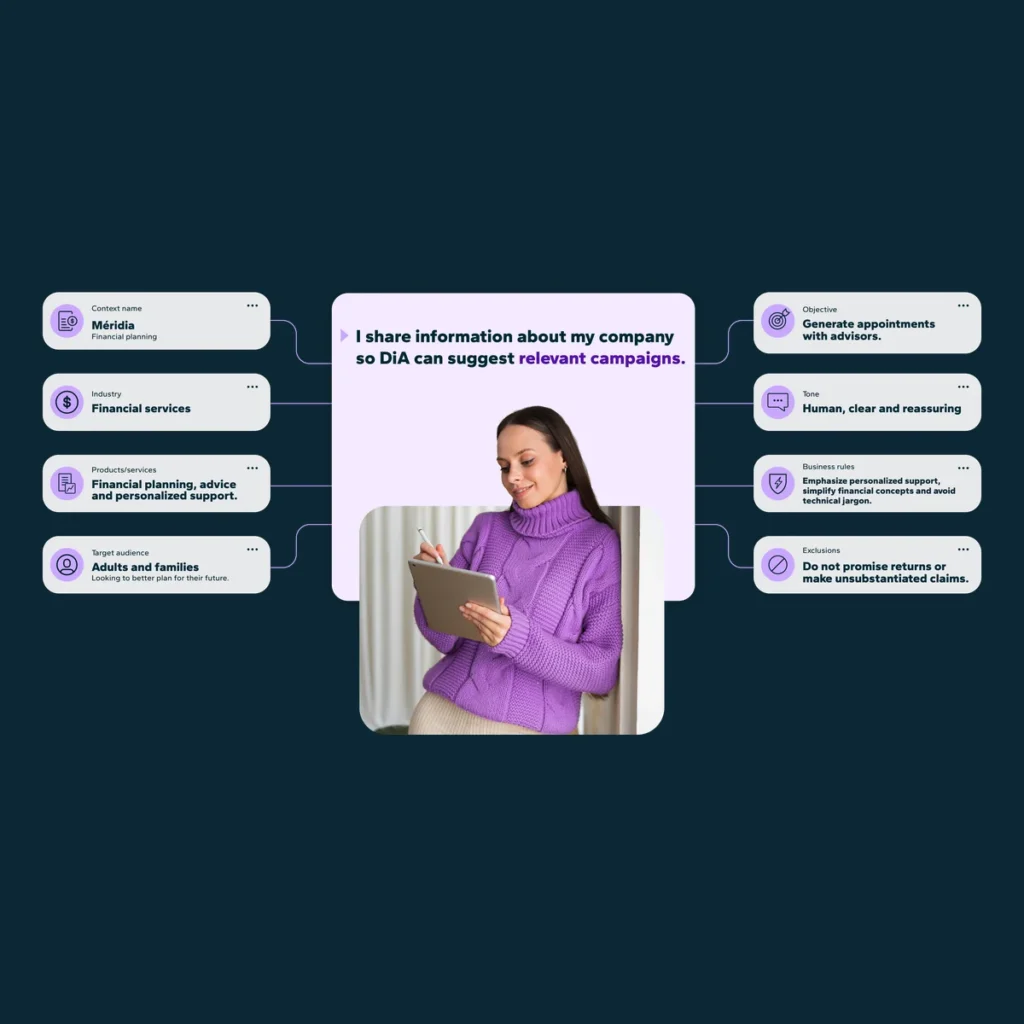
DiA stands out by taking your customer data and different business contexts into account. With DiA Context, provide detailed information about your organization to generate more relevant results that are better aligned with your needs.
You can then create, review, optimize, and activate your campaigns faster.
The AI features available vary depending on your plan.
The Benefits of DiA
Identify Your Contacts’ Interests
Automatically detect what interests your contacts based on their email clicks and the web pages tracked with Journey. Detected interests are available directly in each contact profile to help you better target and personalize your communications.
Accelerate Your Time to Market
Reduce the time between idea and launch. DiA helps you move faster from your initial goal to creating segments, structuring automated campaigns, and generating personalized messages.
Get Relevant and Consistent Results
DiA takes into account the customer data available in the platform, the selected DiA Context, and the goal described in your request to propose campaigns and messages tailored to your needs and business context.
Work More Independently
Complete your tasks more easily without constantly relying on technical teams. With DiA, you remain in control and can refine each proposal before activating it.
Spend More Time on Strategy
Reduce the time spent manually building campaigns so you can focus more on analyzing, optimizing, and improving your marketing initiatives.
How to Get the Most Out of DiA
1. Create Your DiA Contexts
Provide DiA with the information needed to understand your business context, including your industry, products or services, target audience, tone of voice, business rules, exclusions, and any other relevant details.
You can create different DiA Contexts to represent your brands, markets, offers, audiences, or projects.
2. Select the Appropriate Context
When writing your request, select the DiA Context that best matches your needs and the task you want to complete.
3. Describe Your Goal
Clearly explain what you want to accomplish. DiA uses the instructions in your request, the selected context, and the information available in Dialog Insight to generate a tailored result.
4. Review and Refine the Result
Review DiA’s proposal, clarify your expectations, and make any necessary changes. Your expertise remains essential to ensuring the quality and relevance of the final result.
Frequently Asked Questions (FAQ)
What Is DiA?
DiA is the AI assistant built into Dialog Insight. DiA supports your marketing teams at different stages of campaign creation, from understanding your contacts’ interests to writing personalized messages.
What Can DiA Do?
Depending on the features included in your plan, DiA can help you identify your contacts’ interests, create segments from an audience described in your own words, structure automated campaigns, and generate personalized messages.
What Is a DiA Context?
A DiA Context is a set of information that helps DiA understand a specific business context. It can represent a brand, offer, market, audience, or project.
Why Create Multiple DiA Contexts?
Your organization may manage multiple brands, products, services, markets, or audiences. Creating multiple DiA Contexts allows you to tailor results to each situation without repeating the same information in every request.
How Is the Context Selected?
Select the DiA Context that best matches the task you want to complete. If no context is selected, DiA automatically uses the context defined as the default.
Can I Use DiA Without a Context?
Yes. Some DiA features can be used without a context. However, the results may be more generic and require additional refinement.
How Are Contact Interests Identified?
With Interest Profiles, DiA analyzes behavioral signals such as email clicks and web pages tracked with Journey. Detected interests are then available directly in each contact profile.
Which Channels Does DiA Support?
DiA can structure your campaigns based on the channels enabled in your account. For message generation, email is currently the only supported channel. AI-powered SMS message generation is under development.
What Sets DiA Apart from ChatGPT and Other AI Tools?
DiA’s direct integration with Dialog Insight makes it possible to take the selected DiA Context and the customer data available in the platform into account. This gives you results that are better aligned with your business context while reducing manual transfers between different tools.